Project management software is a virtual tool that can help you keep track of all the different parts of a project. There are a lot of different types of project management software out there. One such software is Trello.
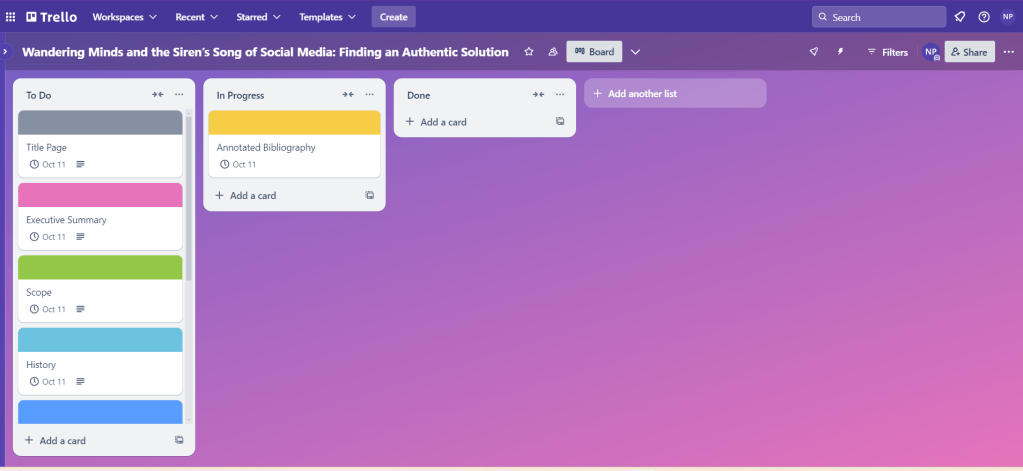
As a visual learner (charts and diagrams!!), I find the vibrant interface of Trello appealing so I chose it for the management of my white paper. I gave the board the same current title I have, “Wandering Minds and the Siren’s Song of Social Media: Finding Authentic Solutions.”
Trello allows the user to create multiple lists and then create cards within these lists. Each card gives the user many different organizational options such as coloring it, attaching an image or document, applying a due date, creating a check list, and much more.
For my lists, I created one titled, “To Do”, another titled “In Progress”, and a third titled “Done.” In the “To Do” list I created a card for each section of the white paper. For each card in the details section, I either typed my rough thoughts, or copy-pasted the instructions from the template for the white paper.
On each card I was also able to apply a different cover color to make them pop more, which is overall easier on my eyes. With the document attachment feature, I plan to drop in a copy of each page as I finish them. This will give me a backup of my paper somewhere other than my computer. I was able to apply the due date for the paper and set up a notification the day before. I also put a reminder in the details section about the rough draft due date as well.
Overall, I think that Trello is a helpful organizational tool to keep track of all the parts of a project. A struggle that I see coming up is updating the board as I get sections of the paper done. However, if I make sure to check on it everyday then it will remain updated. This will be a useful tool for the management of future projects.
 Home
Home 