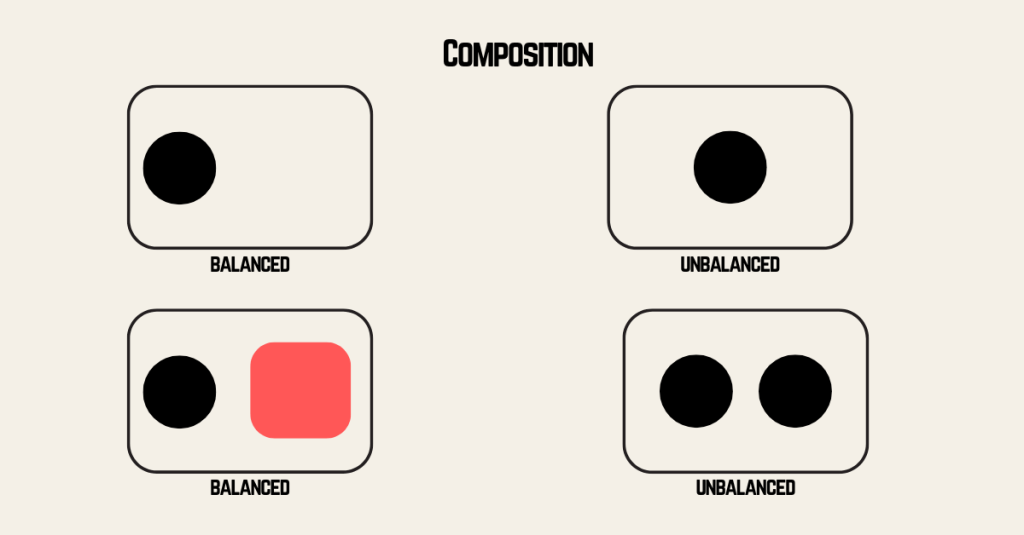
When creating any video, whether it is a feature film, short film, or even just a silly video on YouTube, it is important to understand not only the basics of a camera but also how to use it effectively to create compositions that are pleasing to the eye.
Viewers will not want to watch what you create if it is not pleasing to them. This is why it is essential to understand the camera you are using and how to use it best to make good compositions.
READING & WRITING
The Bare Bones Camera Course for Film and Video
Ch.1 Basics
The first chapter of this book is a comprehensive look at the basics of not only dedicated photography and video cameras but also smartphones and tablet cameras. It discusses how all cameras are an imitation of the human eye, in that both use a lens to gather light reflected from objects. The lens then directs the light onto a surface that senses the pattern formed by the differences in brightness and color of the scene. For our eyes, this scene is translated by our brain into what we see. For cameras, it is stored either on film for film cameras or on a charged couple device (CCD) for a digital camera.
While the human eye has only one lens (unless you wear glasses), a camera has several. The first lens a camera will have is called the “normal lens.” This lens will reproduce objects with the same perspective as a human lens, which is why it’s called a “normal lens.” The next type of lens is a wide lens, which offers a larger view than a normal lens but is typically shorter. Last is a telephone lens, which provides a smaller view and is generally longer. Both wide-angle and telephoto lenses can distort the faces they reproduce in different ways. A caution to keep in mind is to avoid barrel distortion, a more extreme wide-angle effect that causes vertical and horizontal lines to curve near the edges of the frame.
One last thing covered in this chapter is depth of field, which refers to the area in front of the camera where everything looks sharp. You can manipulate the depth of field to create cool camera effects, keeping only one central element in focus.
Schroeppel, T. (2015). Chapter 1: Basics. In The Bare Bones Camera Course for Film and Video (3rd ed., pp. 1–23). essay, Allworth Press.
Ch.2 Composition
This chapter discusses how the basis of all camera work is that viewers will only see what you decide to show them, and that, in turn, you create a narrative.
The chapter goes on to offer advice on achieving good compositions, not only by using a tripod to avoid camera shake, but also by following the rules of composition. Such as:
- Rule of Thirds: mentally dividing the frame into thirds both horizontally and vertically, then placing the elements of the composition on the intersecting points.
- Balancing: creating a more comfortable composition by having space in front of a subject, also known as head or lead room. Placing objects at a distance to nicely leverage them visually. Additionally, bright colors attract the viewer’s attention and carry weight, so they need to be balanced with another bright color or a mass.
- Angles: using a difference in the height of the camera and the subject to create the illusion of depth.
- Leading Lines: directing the eyes of a viewer using a line of some sort, such as a fence, road, or sidewalk, to a focal point.
Schroeppel, T. (2015). Chapter 2: Composition. In The Bare Bones Camera Course for Film and Video (3rd ed., pp. 24–45). essay, Allworth Press.
Ch.5 Camera Moves
This chapter covers basic camera movements, including zooms, pans, tilts, and combinations. Other movements discussed include zoom-in (from wide shot to close-up) to direct attention to the object being zoomed in on. Zoom-out (from close-up to wide shot) is usually used to reveal new information. Pans (horizontal camera movement) and tilts (vertical camera movement) are both ways of revealing new information.
The following rules for making camera moves are also covered:
- Begin and end every move with a well-composed static shot.
- Always move from an uncomfortable position to a comfortable position (which is especially important for pans). Get cozy in the end position, then twist back into the beginning position for the smoothest possible movement.
- Do not continually move your camera. Only move your camera with a purpose that contributes to your viewer’s understanding of the narrative.
Schroeppel, T. (2015). Chapter 5: Camera Moves. In The Bare Bones Camera Course for Film and Video (3rd ed., pp. 73-77). essay, Allworth Press.
Ch.6 Montage
This chapter discusses montages. A montage is a series of related shots used to condense time or distance, set a mood, or summarize information. These usually work best when each shot is clearly distinct, so the viewer doesn’t mistake them for a single long continuous shot.
To achieve this, montages typically use a variety of angles and image sizes for a nice effect. One specific technique that is mentioned here is a Dutch tilt, where you tilt each shot a different way. Dutch tilts are commonly used on signs.
Schroeppel, T. (2015). Chapter 6: Montage. In The Bare Bones Camera Course for Film and Video (3rd ed., pp. 79-80). essay, Allworth Press.
Video Production Planning Checklist: 15 Keys to Success
This article provides a video production checklist—a step-by-step planning tool to ensure every detail is accounted for before rolling the camera. The steps are as follows:
- Define your goals, establish exactly what your video hopes to accomplish.
- Identify your audience; understanding them helps make a video that speaks to them.
- Develop the message of your video and the best way to deliver it.
- Establish your budget, calculate how much you will need to produce your video, and allow some wiggle room for unforeseen costs.
- Plan where you will show your video and what platforms it will be available on.
- Decide the type of video you are going to produce.
- Create a storyboard to make it easier to visualize.
- Write your script as well.
- Scout out your location, in case there are issues with weather, temperature, or seasonal changes that could affect the video.
- Select the equipment you will need to make the video.
- Cast and find the right actors, if applicable.
- Create your schedule so you know exactly how the shooting will proceed.
- Start production, follow your script, and shoot your scenes!
- Start post-production, edit together your video. This is where you layer in high-impact effects, graphics, and all the final polish.
- Bring it to market, post it on socials, and show it where you will.
Trussell, J. (2025, July 18). Video production planning checklist: 15 keys to success. QuickFrame. https://quickframe.com/blog/video-production-planning-checklist/
Learn What a Storyboard Is and How to Use It to Make Better Videos
As the title suggests, this article discusses what a storyboard is, how to make one, and how to use it effectively. A storyboard is a tool that sketches different, usually the most important, scenes in the video you are about to create. They help identify inconsistencies in your idea for both the video and the script. The steps to create a storyboard are as follows:
- Plan the video, decide your objectives, key message, how long it will be, and where you will post and advertise it.
- Visualize your script with a storyboard by identifying key characters or props and when they appear on screen. As well as the theme, the setting, any backdrops, and the order of events or collection of different scenes.
- Add the script and any additional script underneath or beside each box/scene that explains what is happening.
- Collaborate with your team and revise what you have for the best possible version.
The benefits of storyboarding are also discussed, including its effectiveness for visualization, as a great communication tool, and as an easy, inexpensive way to plan and structure your video. Some common mistakes the article suggests avoiding are a lack of clarity, overly complicated shots, ignoring pace, ignoring time, neglecting shot continuity, and forgetting the audience’s point of view.
Athuraliya, A. (2022, November 24). Learn what is a storyboard and how to use it to make better videos. Creately. https://creately.com/guides/how-to-make-a-storyboard-for-video/
RESEARCH TO INFORM
This is a montage scene from the movie Team America. Every time the word montage comes up, I think of this scene — and specifically this song. This scene is also a good example of balanced composition, having headroom when needed and balancing masses when there are two subjects in frame. It also uses a zoom-out shot and, honestly, is a good example of a montage.
This is a silly animated YouTube video titled “Witches on Tinder.” While the video itself is just a good giggle, every shot is balanced well with the characters. Depth of field is also used by blurring the background to give the feeling of depth despite the 2D animation. The video also uses a variety of wide shots and close-ups to tell the story.
This is a very informative video titled “How to Play Chess Properly.” While it starts with a bird’s-eye view to show the whole chessboard, the video makes good use of close-ups and super close-ups to show the different moves the players make. The video also uses color balance, enveloping the chessboard and pieces in a black background to make them stand out.
This is a scene from the animated Disney show The Owl House, featuring two of the main characters defeating a monster through dance. This whole scene is an excellent example of balance, allowing lead room in close-up shots, balancing masses in shots with multiple subjects, and balancing through its use of color. The characters’ colors are stark against the background of every shot; in shots where they are together, there is always a lighter mass nearby, whether it is the shining moon or the glow of their magic about to blow up the monster.
This video is titled “Do you want to take this train?” It is shot from the POV of a model train following the tracks in a very elaborate model train set-up. However, (a very fluffy) someone is on the tracks to stop the train. This video uses a leading line along the rail to direct the viewer’s attention.
CREATE
In preparation for creating my first montage, I conducted a scavenger hunt to practice the different principles of composition in the actual area I plan to make a montage of, the Columbia River Renaissance Trail. I chose this spot because it is very close to where I live, so it is easy to get to. Plus, I am familiar with it.
To take my photos, I used my phone’s camera, which is a Samsung Galaxy S23 FE. I took a stuffed animal out with me to use as a subject in some of the photos, since I did not want to have to rely on a bird or something to stay still. I also wanted to be able to move the subject I was using, which is why I did not use the statues for every photograph, either.
Going out into the area where I plan to film my montage also allowed me to scout and get a better sense of which shots I want to include. Something I had to keep in mind when taking my photographs—and will need to keep in mind as I start filming—is the weather. I live in Vancouver, Washington, which has stormy Northwestern weather. I personally very much enjoy this weather, but it is not always ideal for filming. I had to wait until it wasn’t raining and the sun was out to take photographs. I will need to check the weather and do the same as I plan my filming days next week.
As part of pre-production, I created both a script and a storyboard for my montage. I found this helpful because I wrote notes for the main scenes I wanted on the storyboard pages first. Then I wrote my script before returning to my storyboards to draw. I found some inconsistencies between them. So, I was able to fix them, think critically about the shots I will need most — like shots of the statues and the river — and come up with some ideas for B-roll, like any animals that are out and about to be filmed.
Altogether, I think I have a solid plan to film my montage with proper composition in mind.
 Home
Home 